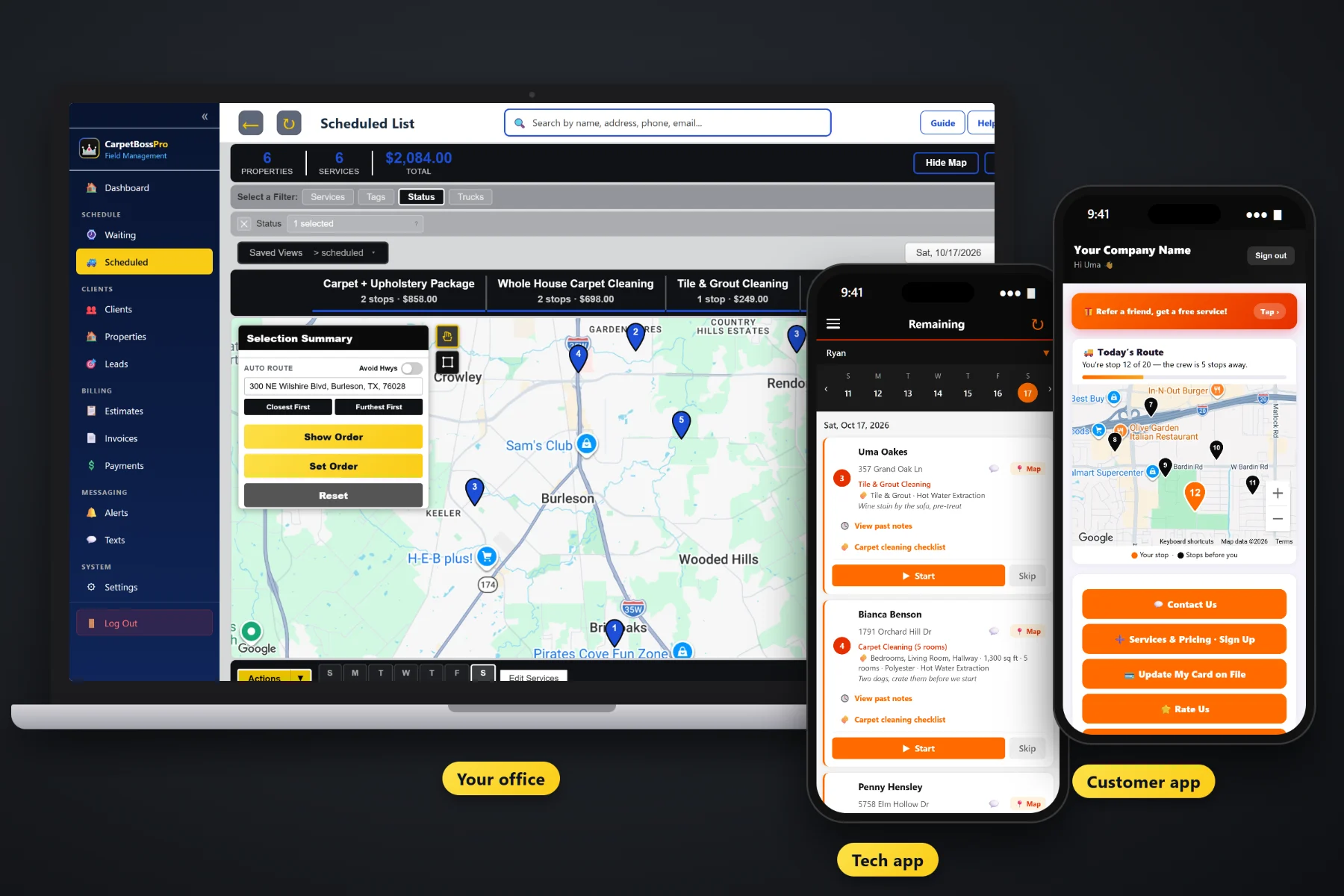
A carpet cleaning business is more than the wand and the truck-mount. It is the phone that rings while you are on a staircase, the customer who was due for a cleaning last spring and never got a call, the estimate nobody followed up on, and the invoice that is still on the dashboard. CarpetBossPro keeps the customers, the repeat cleanings, the estimates, the vans, the techs and the billing in one place, whether you run one van by yourself or a few vans with an office person.
Plans start at $59/month and every plan includes the office side, the tech app and the customer app. Repeat cleanings, reminders, estimates, dispatch, payment and reports are part of the platform, not add-ons you buy one at a time. For the full picture of the product, start at CarpetBossPro, then use the guides on this page for the business side: pricing, hiring, repeat customers, partners and the weekly routine.
Set a yearly or every-six-months cleaning and the home lands on the Waiting List when it is due, instead of waiting for the customer to remember you.
Automatic reminders by text and email, plus two-way texting from the office. Replies land in one place, not on your personal phone.
Build quotes from your own service list, send them for online approval, and the approved estimate becomes the scheduled job with its details.
The dispatch board shows jobs by day and by van, with auto-routing from the shop and printed route sheets for anybody who wants paper.
Every room cleaned, every add-on, the carpet type and the notes from last time stay on the home for the next visit.
Card on file, auto-charge on completion, online payment in the customer app and past-due follow-up for the ones that slip.
Most owner-operators run the business out of their head and their text messages. That works until the second van, the first hire or the first busy November. CarpetBossPro puts the week in front of you: jobs by van, homes that came due for their yearly cleaning, estimates waiting for an answer and invoices that have not been paid.
You did not start a carpet cleaning company to sit at a desk. CarpetBossPro asks for a little setup up front and then does the remembering for you: who is due, who was texted, what was cleaned last time and who still owes. Your techs use it in the browser on the phones they already carry.
CSV import your customer list. Imported addresses are placed on the map automatically, ready for routing and the Waiting List.
Per room, whole house, stairs, hallways, upholstery, area rugs, mattresses, tile & grout and add-ons, at your own prices.
Yearly or every six months for homes, monthly for offices. Each one comes due on the Waiting List by itself.
Schedule by van, run the day from the tech app, and the invoice and card-on-file charge happen at completion.
Generic field-service software gives a job an address and a notes box. A carpet cleaning job is a list of rooms, a set of stairs, a sofa, a pet odor treatment, a carpet type, a cleaning method and a note about where to run the hose. When the software only knows the address, the rest ends up on paper or in your memory.
Ask any carpet cleaning owner where the business really lives and you will hear the same answer: a spiral notebook, a calendar on the phone, a pile of paper invoices and a text thread with every customer. Last year's customers are in there somewhere, but nobody calls them when their yearly cleaning comes due. Nobody remembers which bedroom had the wine stain or whether the stairs were on the last ticket.
That information belongs on the customer's home, not in one person's head. When it is there, a new tech can run the job and a new office person can answer the phone without asking the owner every question.
CarpetBossPro keeps the customer, the home, the rooms, the history and the billing in one place, from the first call to the paid invoice to next year's reminder.
Every tool here exists to book more repeat work, waste fewer trips, answer fewer questions and get paid on the day of the job.
Every home that came due, colored not due yet, due now and overdue past a 7-day grace, plus new requests, so you fill a day by area.
Set by minimum days between visits: yearly or every six months for homes, monthly maintenance for offices.
Built from your service list, priced off rooms or square feet, approved online and turned into the scheduled job.
Follow-up emails and estimate templates, so an unanswered quote gets a nudge without you remembering to send one.
A request form and a sign-up form flow into Form Responses. One click converts a sign-up into a client.
Rooms, stairs, upholstery, rugs, add-ons, square feet, carpet type, method and access notes on every job.
Jobs by day, filtered by van, auto-routed Closest First or Furthest First from the shop, with saved views.
Company login plus PIN, jobs in route order, the carpet checklist, photos, and automatic on-the-way and arrived texts.
Two-way texting from the office and automated reminders by text and email, with a monthly text allowance on every plan.
Customers can rate the job and refer a friend from the customer app.
A property manager or office set to Monthly gets one statement covering every address.
Auto-charge on completion or on a schedule, online payment and past-due follow-up.
Mark realtors, maid service referrals, pet homes or anything else you want to sort by.
Simple reports on your jobs, customers and billing, so you see the week without a spreadsheet.
Office user roles for an office person, and techs with their own PINs and van assignments.
Start $59, Pro $89 and Crew $199 per month, with a 14-day free trial and no credit card.
On day one it is you, one van and a phone. Then it is a second van, a tech who does not know the customers, and an office person who needs to answer questions without calling you. CarpetBossPro is built so each of those steps does not mean starting over: the customer history, job details and access notes are already on every home, the dispatch board already sorts by van, and the office already has its own login. For the whole path, read Running a Carpet Cleaning Business: The Complete Guide From One Van to a Small Fleet.
Carpet cleaning is repeat work, but only if somebody asks for it. A home set to a yearly cleaning comes due on the Waiting List on its own, and reminders by text and email go out without you writing them. In the customer app, customers can sign up for a yearly cleaning plan, request service, see their invoices, pay, look at before-and-after photos, rate the job and refer a neighbor. Replies to texts come back to the office through two-way texting.
Pick the plan that fits your carpet cleaning business. Every plan starts with a 14-day free trial and no credit card.
Compare plans on the pricing page.
No. Plenty of carpet cleaners run one van by themselves, and the same tools that help a three-van shop help an owner-operator: repeat cleanings that come due on their own, reminder texts, estimates that turn into jobs, and invoices paid by card on file the day of the job. When you add a van, a tech or an office person, the records are already there.
Set a home to a yearly or every-six-months cleaning by minimum days between visits. When it comes due, the home shows on the Waiting List map with new requests, colored by status, so you can fill a day by area. Automated reminders by text and email go out, and customers can sign up for a cleaning plan in the customer app.
Yes. Use CSV import to bring in your customers and addresses. Imported addresses are placed on the map automatically, so they are ready for the Waiting List and routing.
Office users have roles, and techs log in to the tech app with your company login and their own personal PIN, with a van assignment. The office sees the finished carpet checklist, photos and notes on each job.
Yes. One client can have many addresses, and an account set to Monthly gets one statement each month covering every address, with each line labeled with its address. Office carpet maintenance can be set to repeat monthly.
Start is $59/month, Pro is $89/month, and Crew is $199/month. Every plan starts with a 14-day free trial with no credit card, and you can click around a fully stocked sample carpet cleaning company in the live demo first.
Running the business is one piece of what CarpetBossPro does. For carpet job details, the tech app, estimates, scheduling and billing, see the full CarpetBossPro platform overview.
Practical reading on growing from one van to a second, hiring a tech and an office person, setting prices and room minimums, yearly repeat customers, reminder texts, reviews and referrals, partners, the holiday rush and slow season, add-ons, reports, owner time and choosing software.
Repeat cleanings that come due on their own, reminder texts, estimates that become jobs, dispatch by van and payment on the day of the job. Try CarpetBossPro free for 14 days.