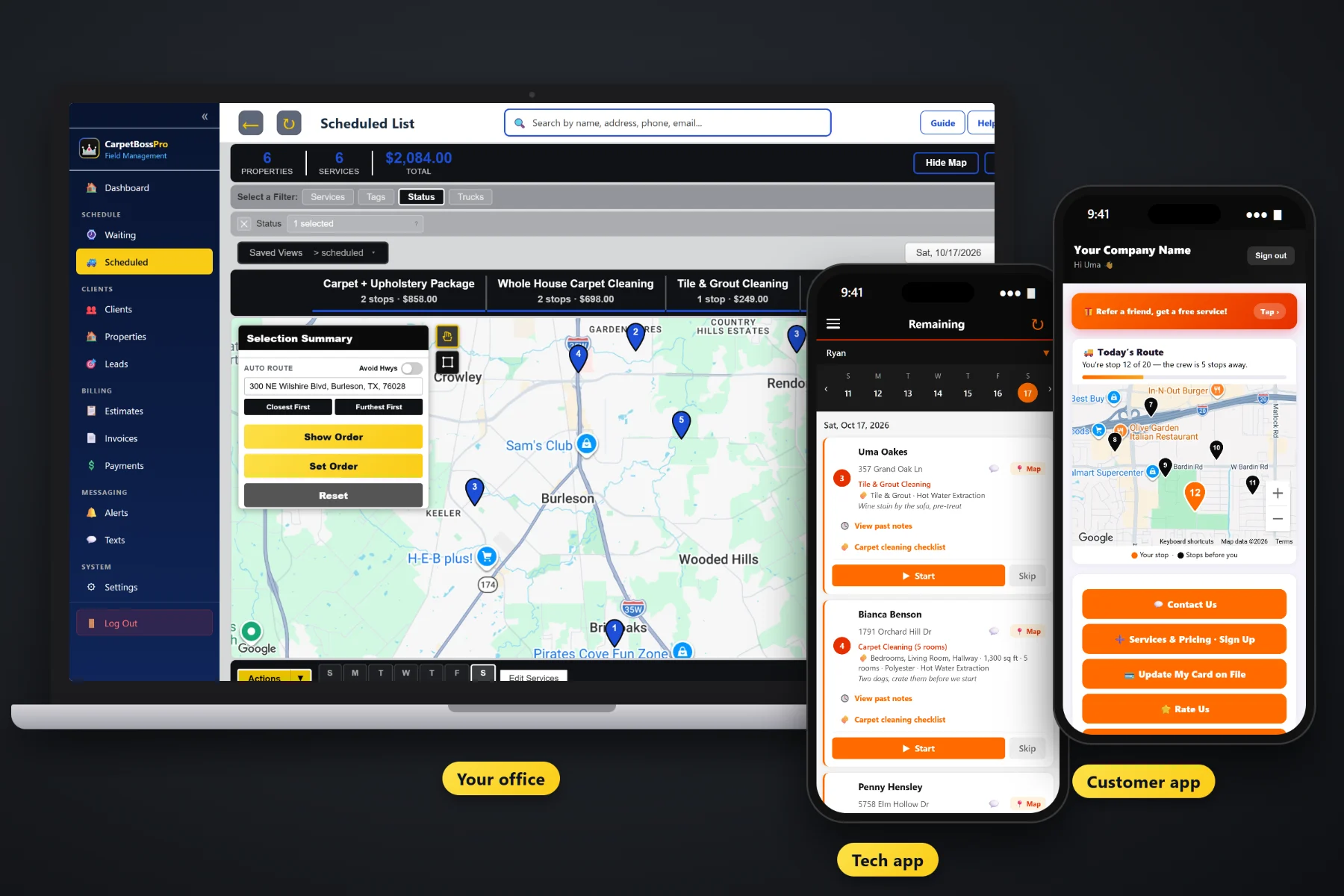
A carpet cleaning day is a handful of long jobs, not a pile of quick ones. Three bedrooms and a hallway, a whole house with stairs, an office after close. CarpetBossPro puts every job on a dispatch board by day and van, auto-routes from the shop, shows every yearly and six-month cleaning that has come due on a Waiting List map, and sends the customer automatic night-before, on-the-way and arrived texts so somebody is home and the furniture is ready.
Plans start at $59/month, and scheduling and dispatch come with every plan. The dispatch board, auto-routing, the Waiting List map, route sheets and customer texts are part of the platform, not an add-on. To see how scheduling fits with estimates, the tech app and billing, start at CarpetBossPro and then dig into the booking side here.
The Scheduled List shows every job by day. Filter by van to see one truck's day, top to bottom.
Closest First or Furthest First from your shop, then nudge the order by hand for the customer who needs the first slot.
Every yearly and six-month cleaning that has come due, plus new requests, on a live map colored by status.
Rooms, square feet, stairs, upholstery, add-ons and access notes travel with the job from the estimate to the van.
Night-before, on-the-way and arrived alerts, chosen by the customer, so the furniture is cleared and the dog is put up.
Every van on the office map, so the spill call at 2pm goes to whoever is closest.
Two rooms and a hall is a short stop. A whole house with stairs, a sectional and pet odor treatment eats most of a morning. CarpetBossPro keeps the rooms, square feet and add-ons on every job, so whoever builds tomorrow's schedule can see how much work is on each van before promising another customer a morning slot.
Most carpet cleaning owners build the schedule at the kitchen table after a full day on the wand. CarpetBossPro cuts that down to a few steps: see what is due, pick an area, assign a van, route it, and let the texts go out on their own.
Import your list by CSV and the addresses land on the map. Set up vans and techs with personal PINs.
Yearly and six-month homes, monthly office maintenance. Each one shows up on the Waiting List map when it is due.
Pick the cluster of due homes on one side of town, assign them to a van and a day, and auto-route from the shop.
Customers get their night-before reminder. Techs see the day in route order on the phone, or on a printed route sheet.
Generic field-service software and calendar apps give every appointment the same box on the same grid. A carpet cleaning job has rooms and square feet, a customer who needs to be home, furniture that has to be moved, and carpet that needs time to dry before the family walks on it.
Ask a carpet cleaning owner how scheduling really works and you will hear the same story: a paper calendar by the phone, a spreadsheet of last year's customers nobody has called back, and a van that drove from one end of town to the other because two jobs were booked by two different people. A customer who was not home. A move-out that had to be done before Friday's walk-through and almost wasn't.
The schedule belongs in one place that everyone can see, tied to the customer, the address and the job details. When it is, anyone in the office can book a job without stepping on a van that is already full.
CarpetBossPro keeps the customer, the address, the rooms, the van and the day in one place, from the first estimate to the paid invoice.
Every tool here exists to fill your vans, cut the driving between jobs and keep customers home and ready when the truck pulls up.
The Scheduled List shows jobs by day. Filter by van to see exactly what each truck has.
Closest First or Furthest First from the shop puts a van's jobs in a sensible order in one click.
Move the customer who must be first, or the office that opens at six, to the right spot in the day.
Pins colored not due yet, due now and overdue past a 7-day grace, plus new requests.
Set minimum days between visits for yearly or six-month homes and monthly office maintenance.
Rooms, square feet, carpet type, method, upholstery and add-ons on every job and estimate.
Pets, gate codes, where to park the van and where to run the hose, on the address.
Automatic text and email reminders so the customer clears small items and puts the pets away.
Sent automatically from the tech app as the van works the route.
In the customer app: "You're stop 3 of 6 — the crew is 2 stops away."
Every van on the office map, for same-day spill and pet calls.
Print a van's day in route order for the dashboard or the tech who likes paper.
Keep the residential van, the commercial van and the full week one click away.
An approved estimate becomes the scheduled job with all its details carried over.
The day in route order on iPhone and Android, in the browser. No app store.
Start $59, Pro $89 and Crew $199 per month, with scheduling on every plan.
Your repeat customers come due on their own from each plan's minimum days between visits, and they land on the Waiting List map next to new requests from your website form. The office picks a cluster on one side of town, assigns it to a van and a day, auto-routes Closest First or Furthest First from the shop, and the tech's phone shows the same order. For the full walkthrough, read Carpet Cleaning Scheduling Software: The Complete Guide to Booking, Routing and Dispatching Your Vans.
Carpet cleaning happens inside the house, so a customer who forgot the appointment is a lost stop. Automatic reminders the night before, on-the-way and arrived texts as the tech works the route, and a live map in the customer app all tell the homeowner when to expect the van. Replies come back to the office through two-way texting, and customers can request service and see their invoices in the same app.
Pick the plan that fits your operation. Every plan starts with a 14-day free trial and no credit card.
Compare plans on the pricing page.
Each repeat plan has a minimum number of days between visits, such as a yearly or six-month whole-house cleaning or monthly office carpet maintenance. When a home comes due, it shows on the Waiting List map and list, colored due now, or overdue once it is past a 7-day grace. You pick the ones you want, assign them to a van and a day, and they move onto the dispatch board.
Yes. Auto-route puts a van's jobs in order Closest First or Furthest First from your shop. You can then move any job by hand, for example a customer who has to be first because they leave for work at nine.
Every job carries the rooms checked off, the square feet, the number of rooms and the add-ons, so the person building the schedule can see how big each job is. You decide how much time your crew needs for that much carpet and plan the day around it.
Customers can get a reminder the night before, a text when they are next, and a text when the tech arrives. On-the-way and arrived texts go out automatically from the tech app, and the customer app shows a live map with their place in line.
Yes. A common setup is one van on residential jobs during the day and one on offices and apartments after hours. Filter the dispatch board by van, keep a saved view for each, and print a route sheet for either.
Start is $59/month, Pro is $89/month, and Crew is $199/month. Scheduling and dispatch are on every plan, and every plan starts with a 14-day free trial with no credit card.
Scheduling is one piece of how CarpetBossPro runs a carpet cleaning company. For estimates, the tech app, repeat cleanings, property manager accounts and billing, see the full CarpetBossPro platform overview.
Practical reading on planning job length, the dispatch board, auto-routing, the Waiting List map, repeat cleanings, dry time, arrival windows, emergencies, after-hours commercial work, move-outs, customer texts, crew GPS, route sheets and the holiday rush.
A dispatch board by day and van, auto-routing from the shop, a Waiting List map of every cleaning that is due, and automatic customer texts. Try CarpetBossPro free for 14 days.