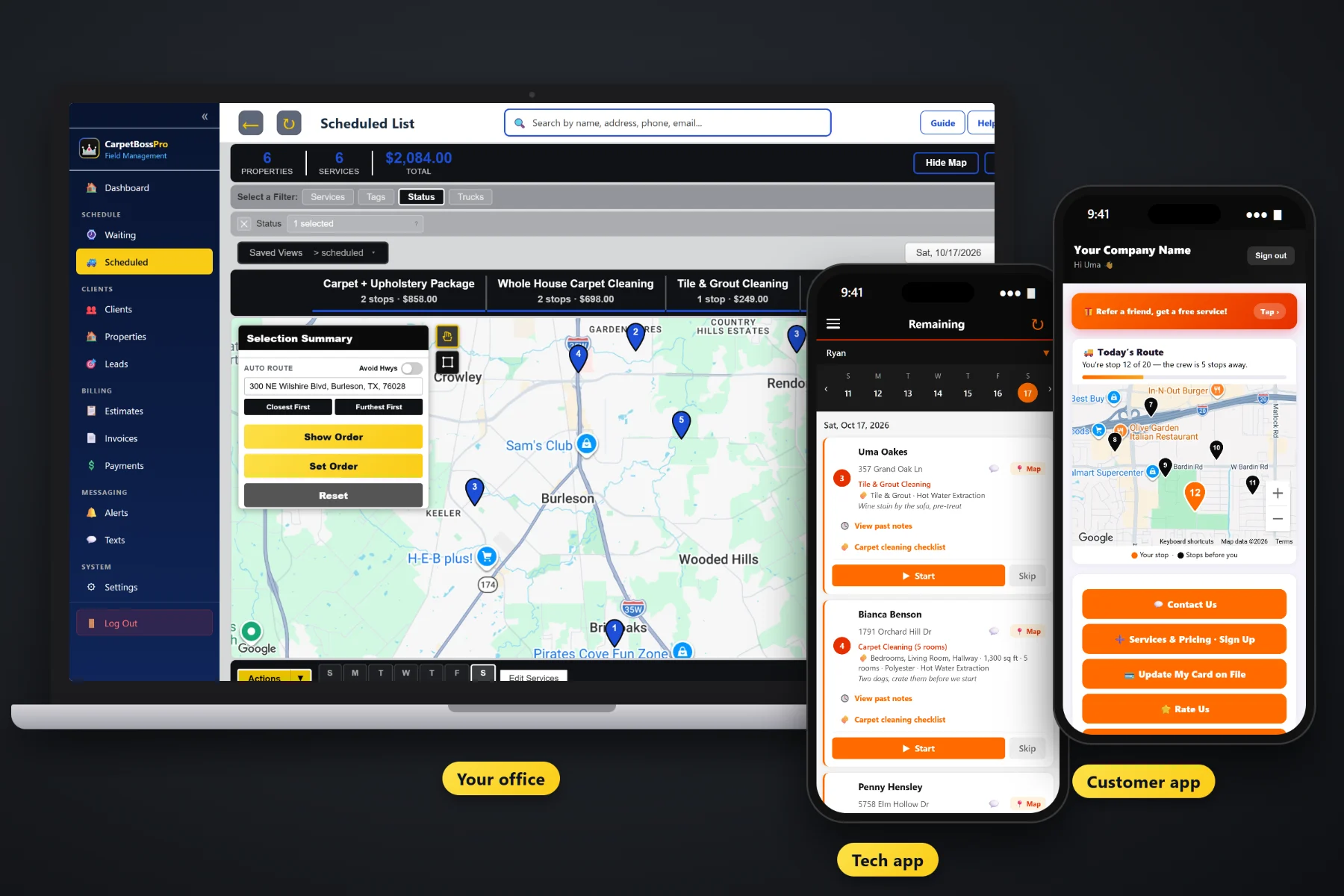
A carpet cleaning invoice is three bedrooms, a hallway, a staircase, a sofa, pet odor treatment in the back room and stain protector on the living room, plus tax. CarpetBossPro builds that invoice from the job, charges the card on file when the tech taps Complete, lets customers pay online in the customer app, follows up on anything past due, and rolls every address an office, apartment complex or property manager owns into one monthly statement.
Plans start at $59/month, and invoicing, card on file, auto-charge, online payment and monthly statements are part of every plan. Billing is not a separate add-on you pay extra for. To see how billing fits with estimates, the Waiting List, routing and the tech app, start at CarpetBossPro and then dig into the money side here.
Each room, the stairs, the sofa, the rug and every add-on show as their own line, priced from your own service list.
Keep a card on the client and charge it when the work is done, so nobody waits on a check in the mail.
When the tech taps Complete, the invoice is created and the card on file can be charged before the van leaves.
Customers see their invoices in the customer app, pay them, and update their own card.
Unpaid invoices get followed up, so the office is not keeping a list of who still owes.
Offices, apartment complexes and property managers get one statement a month with every address labeled.
Whoever wrote the estimate already picked the rooms, the stairs, the upholstery and the add-ons. When the customer approves, those details carry onto the job, and the job carries onto the invoice. Nobody copies a carbon ticket into a spreadsheet at nine at night.
Most carpet cleaners did not start a business to do bookkeeping at the kitchen table. CarpetBossPro ties the invoice to the job, so finishing the work and billing for it are the same step.
Add your prices per room, per square foot, whole house, stairs, upholstery pieces, rugs, mattresses, tile & grout and add-ons, plus your sales tax.
Build the estimate from that list. The customer approves online and the approved estimate becomes the scheduled job with every line intact.
The checklist is done, the photos are taken, and Complete creates the invoice and can charge the card on file.
Open invoices can be paid in the customer app, past-due ones get followed up, and monthly accounts get one statement.
A generic invoice tool gives you a blank line and a total. A carpet cleaning bill is rooms and steps and furniture pieces and add-ons, and some of it gets sold in the living room after the walk-through.
Ask any carpet cleaning owner where the money leaks and you will hear the same story: a paper ticket that said “3 rooms” when the tech did four, a pet odor treatment sold on site that never made it onto the bill, and a property manager who wants one invoice for twelve move-outs instead of twelve separate ones. Then there is the check that was “in the mail” three weeks ago.
That billing information belongs on the job, not on a carbon copy or in a spreadsheet. When the invoice is built from the job, what was cleaned is what gets billed, and getting paid stops depending on somebody remembering to send it.
CarpetBossPro keeps the estimate, the job, the invoice and the payment in one place, from the first quote to the paid statement.
Every tool here exists to get carpet and upholstery work billed correctly and paid sooner, with less office time spent chasing it.
Rooms, stairs, hallways, upholstery pieces, rugs, mattresses, tile & grout and add-ons as separate lines.
Per room, per square foot, whole house or per piece, from the service list you set up.
Tax calculated on the invoice, so the office is not doing math by hand.
The approved estimate becomes the job, and the job details carry onto the invoice.
Store a card on the client and charge it when the work is done.
The tech taps Complete in the tech app and the invoice is created and can be charged.
Charge automatically on completion or on a schedule.
Customers see invoices, pay online and update their card themselves.
Unpaid invoices get followed up by text and email.
Accounts set to Monthly get one statement covering every address, each line labeled.
A landlord or property manager is one client with every unit and building under it.
Before/after photos and the finished checklist sit with the job if a bill is questioned.
Answer billing questions by text from the office, with the conversation kept with the customer.
See what was billed and what is still open without building a spreadsheet.
Bill customers in the US, Canada, Australia, New Zealand and the UK in their own currency.
Start $59, Pro $89 and Crew $199 per month, with billing on every plan.
Residential customers pay job by job. Offices, apartment complexes and property managers usually want one bill. Set the client to Monthly and CarpetBossPro rolls every job at every address into one statement each month, with each line labeled by address, so their bookkeeper can match the work to the building. Move-out cleanings for a landlord go on the landlord's account, not the tenant's. For the full walkthrough, read Carpet Cleaning Invoicing Software: The Complete Guide to Billing Carpet, Upholstery and Commercial Jobs.
The customer app is where homeowners and account contacts see their invoices, pay online, update the card on file and look at the before/after photos from the job. When a card expires or gets declined, the customer can put in a new one without reading numbers to the office over the phone. Billing questions come back to the office through two-way texting.
Pick the plan that fits your operation. Every plan starts with a 14-day free trial and no credit card.
Compare plans on the pricing page.
From the job. The rooms, stairs, upholstery, rugs and add-ons on the approved estimate carry onto the job, and the invoice lists them as line items priced from your own service list, with sales tax added.
Yes. When the tech taps Complete in the tech app, the invoice is created and the card on file can be charged. You can also set auto-charge to run on completion or on a schedule.
The tech lets the office know, by a note on the job or a quick text or call, and the office adds the add-on to the job before it is completed, so the invoice and the charge include it. The price comes from your service list, not from the tech guessing.
Set the client to Monthly. They get one statement each month covering every address, with each line labeled by address. That works for office buildings, apartment complexes and landlords with move-out cleanings.
The invoice stays open. The customer can update their card and pay in the customer app, past-due follow-up keeps reminding them, and the office can text them directly.
Start is $59/month, Pro is $89/month, and Crew is $199/month. Billing is on every plan, and every plan starts with a 14-day free trial with no credit card.
Billing is one piece of how CarpetBossPro runs a carpet cleaning company. For estimates, the Waiting List, routing, the tech app and the customer app, see the full CarpetBossPro platform overview.
Practical reading on line items, sales tax, card on file, charging at completion, auto-charge, customer app payments, declined cards, past-due follow-up, yearly plans, monthly statements, move-outs, reports and cash flow.
Line-item invoices from the job, card-on-file charges at completion, online payment in the customer app and one monthly statement for every commercial account. Try CarpetBossPro free for 14 days.